Java Techies: Solution for All
Java Techies: Solution for All
package client;

import java.awt.Dimension;
import java.awt.Frame;
import java.awt.Rectangle;
import javax.swing.JFrame;
import javax.swing.JLabel;

public class Frame1 extends JFrame {
    private JLabel jLabel1 = new JLabel();
    private JLabel jLabel2 = new JLabel();

    public Frame1() {
        try {
            jbInit();
        } catch (Exception e) {
            e.printStackTrace();
        }
    }

    private void jbInit() throws Exception {
        this.getContentPane().setLayout( null );
        this.setSize( new Dimension(400, 300) );
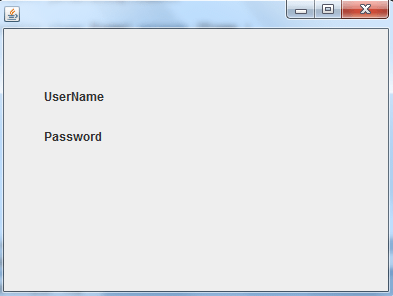
        jLabel1.setText("UserName");
        jLabel1.setBounds(new Rectangle(40, 55, 80, 25));
        jLabel2.setText("Password");
        jLabel2.setBounds(new Rectangle(40, 95, 60, 25));
        this.getContentPane().add(jLabel2, null);
        this.getContentPane().add(jLabel1, null);
    }
    public static void main(String args[]) {
        Frame1 frame=new Frame1();
        frame.setVisible(true);
    }
}
Output
package client;

import java.awt.Dimension;
import java.awt.Rectangle;
import javax.swing.JFrame;
import javax.swing.JLabel;
import javax.swing.JTextField;

public class Frame2 extends JFrame {
    private JTextField jTextField1 = new JTextField();
    private JLabel jLabel1 = new JLabel();

    public Frame2() {
        try {
            jbInit();
        } catch (Exception e) {
            e.printStackTrace();
        }
    }

    private void jbInit() throws Exception {
        this.getContentPane().setLayout( null );
        this.setSize( new Dimension(400, 300) );
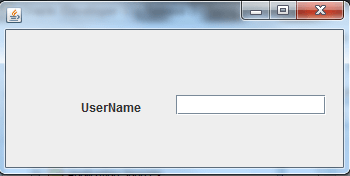
        jTextField1.setBounds(new Rectangle(170, 65, 150, 20));
        jLabel1.setText("UserName");
        jLabel1.setBounds(new Rectangle(70, 60, 34, 14));
        this.getContentPane().add(jLabel1, null);
        this.getContentPane().add(jTextField1, null);
    }
}
Output
package client;

import java.awt.Dimension;
import java.awt.Rectangle;
import javax.swing.JFrame;
import javax.swing.JLabel;
import javax.swing.JTextArea;

public class Frame1 extends JFrame {
    private JTextArea jTextArea1 = new JTextArea();
    private JLabel jLabel1 = new JLabel();

    public Frame1() {
        try {
            jbInit();
        } catch (Exception e) {
            e.printStackTrace();
        }
    }

    private void jbInit() throws Exception {
        this.getContentPane().setLayout( null );
        this.setSize( new Dimension(400, 300) );
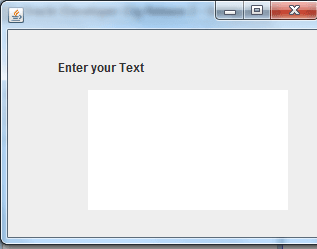
        jTextArea1.setBounds(new Rectangle(100, 60, 230, 140));
        jLabel1.setText("Enter your Text");
        jLabel1.setBounds(new Rectangle(60, 40, 185, 15));
        this.getContentPane().add(jLabel1, null);
        this.getContentPane().add(jTextArea1, null);
    }
    public static void main(String agrs[]) {
        Frame1 frame=new Frame1();
        frame.setVisible(true);
    }
}
Output
package client;

import java.awt.Dimension;
import java.awt.Rectangle;
import javax.swing.JButton;
import javax.swing.JFrame;
import javax.swing.JLabel;
import javax.swing.JPasswordField;
import javax.swing.JTextField;

public class Frame2 extends JFrame {
    private JTextField jTextField1 = new JTextField();
    private JLabel jLabel1 = new JLabel();
    private JButton jButton1 = new JButton();
    private JLabel jLabel2 = new JLabel();
    private JPasswordField jPasswordField1 = new JPasswordField();

    public Frame2() {
        try {
            jbInit();
        } catch (Exception e) {
            e.printStackTrace();
        }
    }

    private void jbInit() throws Exception {
        this.getContentPane().setLayout( null );
        this.setSize( new Dimension(400, 300) );
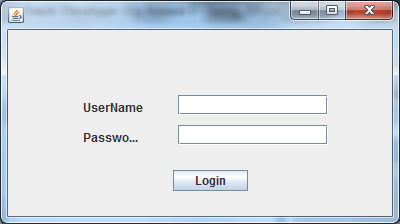
        jTextField1.setBounds(new Rectangle(170, 65, 150, 20));
        jLabel1.setText("UserName");
        jLabel1.setBounds(new Rectangle(75, 70, 75, 15));
        jButton1.setText("Login");
        jButton1.setBounds(new Rectangle(165, 140, 75, 21));
        jLabel2.setText("Password");
        jLabel2.setBounds(new Rectangle(75, 100, 55, 15));
        jPasswordField1.setBounds(new Rectangle(170, 95, 150, 20));
        this.getContentPane().add(jPasswordField1, null);
        this.getContentPane().add(jLabel2, null);
        this.getContentPane().add(jButton1, null);
        this.getContentPane().add(jLabel1, null);
        this.getContentPane().add(jTextField1, null);
    }
    public static void main(String[] args) {
        Frame2 ff=new Frame2();
        ff.setVisible(true);
    }
}
Output
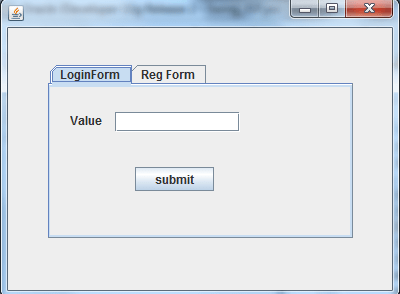
package project1;

import java.awt.Dimension;
import java.awt.Rectangle;
import javax.swing.JButton;
import javax.swing.JFrame;
import javax.swing.JLabel;
import javax.swing.JPanel;
import javax.swing.JTabbedPane;
import javax.swing.JTextField;

public class Frame1 extends JFrame {
    private JTabbedPane jTabbedPane1 = new JTabbedPane();
    private JPanel panel1 = new JPanel();
    private JPanel panel2 = new JPanel();
    private JButton jButton1 = new JButton();
    private JLabel jLabel1 = new JLabel();
    private JTextField jTextField1 = new JTextField();
    private JButton jButton2 = new JButton();

    public Frame1() {
        try {
            jbInit();
        } catch (Exception e) {
            e.printStackTrace();
        }
    }

    private void jbInit() throws Exception {
        this.getContentPane().setLayout( null );
        panel1.setLayout(null);
        panel2.setLayout(null);
        this.setSize( new Dimension(400, 300) );
        jTabbedPane1.setBounds(new Rectangle(40, 35, 305, 175));
        jButton1.setText("submit");
        //jTabbedPane1.addTab("jButton1", jButton1);
        jLabel1.setText("Value");
        jLabel1.setBounds(new Rectangle(20, 25, 41, 16));
        jTextField1.setBounds(new Rectangle(65, 25, 125, 20));
        jButton2.setText("submit");
        jButton2.setBounds(new Rectangle(85, 80, 79, 24));
        panel1.add(jButton2, null);
        panel1.add(jTextField1, null);
        panel1.add(jLabel1, null);
        jTabbedPane1.addTab("LoginForm", panel1);
        jTabbedPane1.addTab("Reg Form", panel2);
        this.getContentPane().add(jTabbedPane1, null);
    }
    public static void main(String[] args) {
        Frame1 obj = new Frame1();
        obj.setVisible(true);
    }
}
Output
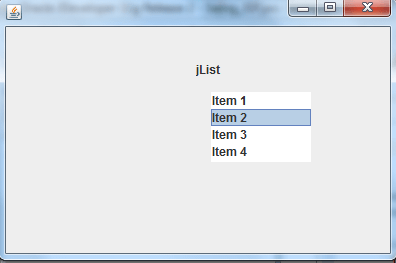
package client;

import java.awt.Dimension;
import java.awt.Rectangle;
import javax.swing.JFrame;
import javax.swing.JLabel;
import javax.swing.JList;
public class Frame1  extends JFrame {

    String  listData[] =
                    {
                     	"Item 1",
                     	"Item 2",
                     	"Item 3",
                     	"Item 4"
                    };

    private JList jList1 = new JList(listData);
    private JLabel jLabel1 = new JLabel();

    public Frame1() {
        try {
            jbInit();
        } catch (Exception e) {
            e.printStackTrace();
        }
    }

    private void jbInit() throws Exception {
        this.getContentPane().setLayout( null );
        this.setSize(new Dimension(400, 264));
        jList1.setBounds(new Rectangle(205, 65, 100, 70));
        jLabel1.setText("jList");
        jLabel1.setBounds(new Rectangle(190, 30, 65, 25));
        this.getContentPane().add(jLabel1, null);
        this.getContentPane().add(jList1, null);

    }
    public static void main(String agrs[]) {
        Frame1 frame=new Frame1();
        frame.setVisible(true);
    }
}
Output
package project1;

import java.awt.Dimension;
import java.awt.Rectangle;
import javax.swing.JFrame;
import javax.swing.JLabel;
import javax.swing.JTable;


public class Frame1 extends JFrame {

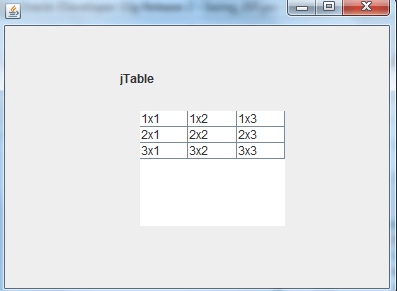
 Object rowData[][] = {  { "1x1", "1x2", "1x3" },
		{ "2x1", "2x2", "2x3" },
		{ "3x1", "3x2", "3x3" } };
        Object columnNames[] = { "Col 1", "Col 2", "Col 3" };
        JTable table = new JTable(rowData, columnNames);
        private JLabel jLabel1 = new JLabel();

    public Frame1() {
        try {
            jbInit();
        } catch (Exception e) {
            e.printStackTrace();
        }
    }

    private void jbInit() throws Exception {
        this.getContentPane().setLayout( null );
        this.setSize( new Dimension(400, 300) );
        table.setBounds(new Rectangle(135, 85, 145, 115));
        jLabel1.setText("jTable");
        jLabel1.setBounds(new Rectangle(115, 45, 90, 15));
        this.getContentPane().add(jLabel1, null);
        this.getContentPane().add(table, null);

    }
    public static void main(String[] args) {
        Frame1 obj = new Frame1();
        obj.setVisible(true);
    }
}
Output
package client;

import java.awt.Dimension;
import java.awt.Rectangle;
import javax.swing.JFrame;
import javax.swing.JLabel;
import javax.swing.JTree;

public class Frame1  extends JFrame {
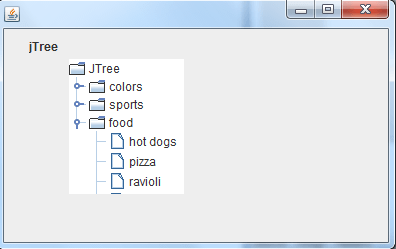
     private JTree jTree1 = new JTree();
    private JLabel jLabel1 = new JLabel();

    public Frame1() {
        try {
            jbInit();
        } catch (Exception e) {
            e.printStackTrace();
        }
    }

    private void jbInit() throws Exception {
        this.getContentPane().setLayout( null );
        this.setSize(new Dimension(400, 264));
        jTree1.setBounds(new Rectangle(65, 30, 115, 135));
        jLabel1.setText("jTree");
        jLabel1.setBounds(new Rectangle(25, 10, 50, 15));
        this.getContentPane().add(jLabel1, null);
        this.getContentPane().add(jTree1, null);

    }
    public static void main(String agrs[]) {
        Frame1 frame=new Frame1();
        frame.setVisible(true);
    }
}
Output
package client;

import java.awt.Dimension;
import javax.swing.JColorChooser;
import javax.swing.JFrame;
import javax.swing.JPanel;

public class Frame1 extends JFrame {

	public Frame1() {
		setTitle("JColorChooser");
		JColorChooser cc=new JColorChooser();
        JPanel content=(JPanel)getContentPane();
        content.add(cc,"Center");
    }

	private void jbInit() throws Exception {
		this.getContentPane().setLayout( null );
		this.setSize( new Dimension(400, 300) );
	}

	public static void main(String args[]) {
		Frame1 frame=new Frame1();
		frame.setVisible(true);
	}
}
Output
import javax.swing.*;
import javax.swing.event.*;
import java.awt.*;
import java.awt.Color;
import java.awt.event.*;

// Class implements three different types of listener.

public class Frame1 {

    public JPanel createContentPane()
    {
        JPanel totalGUI = new JPanel();
        totalGUI.setBackground(Color.white);
        totalGUI.setMinimumSize(new Dimension(300, 200));
        totalGUI.setPreferredSize(new Dimension(300, 200));
        totalGUI.setMaximumSize(new Dimension(300, 200));
        totalGUI.setOpaque(true);
        return totalGUI;
    }
    public JMenuBar createMenuBar()
    {
        //Create the menu bar.
        JMenuBar menuBar = new JMenuBar();
        //Add a JMenu
        JMenu ff= new JMenu("File");
        JMenu ee = new JMenu("Edit");
        JMenu vv = new JMenu("View");

        menuBar.add(ff);
        menuBar.add(ee);
        menuBar.add(vv);

        JMenuItem File = new JMenuItem("save");
        JMenuItem Edit = new JMenuItem("saveas");
        JMenuItem View = new JMenuItem("open");

        ff.add(File);
        ff.add(Edit);
        ff.add(View);

        JMenuItem font =  new JMenuItem("font");
	    JMenu source = new JMenu("source");
        JMenuItem path= new JMenuItem("path");

        source.add(path);
        source.add(path);

	    ee.add(font);
        ee.add(source);

        // display the CheckBoxMenuItem
        // and another SubMenu with more CheckBoxes in it.

        JCheckBoxMenuItem properties = new JCheckBoxMenuItem("properties");
        JCheckBoxMenuItem application = new JCheckBoxMenuItem("Applicatio");
        JMenu Team = new JMenu("Team");
        JCheckBoxMenuItem chat = new JCheckBoxMenuItem("Chat");
        JCheckBoxMenuItem video = new JCheckBoxMenuItem("Video");
        Team.add(chat);
        Team.add(video);

        vv.add(properties);
        vv.add(application);
        vv.add(Team);

        return menuBar;
    }

    private static void createAndShowGUI() {

        JFrame.setDefaultLookAndFeelDecorated(true);
        JFrame frame = new JFrame("JMenuBar");

        //Create and set up the content pane.
        Frame1 demo = new Frame1();
        frame.setContentPane(demo.createContentPane());
        // set the MenuBar of the Frame to our MenuBar
        frame.setJMenuBar(demo.createMenuBar());
        frame.setDefaultCloseOperation(JFrame.EXIT_ON_CLOSE);
        frame.pack();
        frame.setVisible(true);
    }
    public static void main(String[] args) {

        //creating and showing this application's GUI.
        SwingUtilities.invokeLater(new Runnable() {
            public void run() {
                createAndShowGUI();
            }
        });
    }
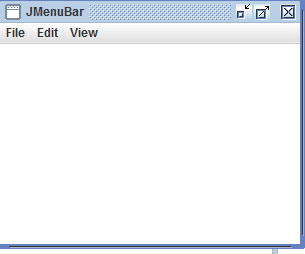
}
Output
import javax.swing.*;
import java.awt.Dimension;

public class Frame5{

    public JPanel createContentPane (){

         JPanel GUI = new JPanel();

         String story = "Welcome to the world of tkhts.com
                         where we spread the knowledge of innovators
                         absolutely free."+

                         "jtechies Heights is a
                          real-time website
                          that connects you to the latest technology."+
                         "This is a growing platform which will keep you updated

                         A huge knowledge bank comprising of various
                         technologies is on its way and there is lots
                         more in the store."+
                         " This will surely help you scale new technology heights
                          in your professional career."+
                         "This is a growing platform which will keep you updated
                         with best-

                         A huge knowledge bank comprising of various technologies
                         is on its way and there is lots more in the store.
                          This will surely help you scale new technology heights
                           in your professional career.\n" +
                         "\n" +
                         "Our aim behind developing this website is to educate everyone
                          and to provide access to new technologies to the newcomers
                         and
                         keep industry professionals updated with trends.\n" +
                         "\n" +
                         "If you think it is worth to visit this website, kindly share
                          it with your friends and colleagues. ";


        JTextArea sa = new JTextArea(story);
        sa.setEditable(false);
        sa.setLineWrap(true);
        sa.setWrapStyleWord(true);

        // Create the ScrollPane and instantiate it with the TextArea as an argument
        // along with two constants that define the behaviour of the scrollbars.
        JScrollPane area = new JScrollPane
        (sa, JScrollPane.VERTICAL_SCROLLBAR_AS_NEEDED,
        JScrollPane.HORIZONTAL_SCROLLBAR_AS_NEEDED);

        area.setPreferredSize(new Dimension(300, 200));

        // and add it to the GUI.
        GUI.add(area);
        GUI.setOpaque(true);
        return GUI;
    }

    private static void createAndShowGUI() {

        JFrame.setDefaultLookAndFeelDecorated(true);
        JFrame frame = new JFrame(" JScrollPane");

        Frame5 demo = new Frame5();
        frame.setContentPane(demo.createContentPane());

        frame.setDefaultCloseOperation(JFrame.EXIT_ON_CLOSE);
        frame.setSize(350, 300);
        frame.setVisible(true);
    }

    public static void main(String[] args) {

        SwingUtilities.invokeLater(new Runnable() {
            public void run() {
                createAndShowGUI();
            }
        });
    }
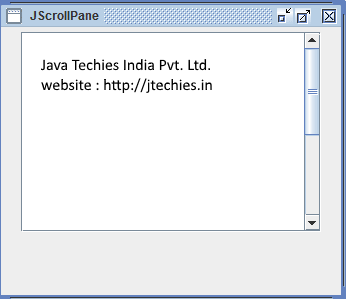
}
Output
package swing;
import java.awt.*;
import javax.swing.*;
class Frame3 extends JFrame
{
  private static final long serialVersionUID = 1L;
  JTabbedPane jtabbedpane;

  public Frame3()
  {
    super("JTabbedPane");setSize(200,200);
    Container contents=getContentPane();
    jtabbedpane=new JTabbedPane();
    jtabbedpane.addTab("1.TAB",new JLabel("First Tab"));
    jtabbedpane.addTab("2.TAB",new JButton("Second Tab"));
    jtabbedpane.addTab("3.TAB",new JCheckBox("Third Tab"));
    contents.add(jtabbedpane);
    setDefaultCloseOperation(EXIT_ON_CLOSE);
    setVisible(true);
  }
  public static void main (String args[]) {
	new Frame3();
  }
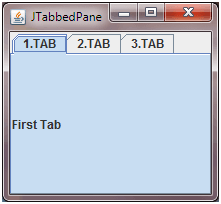
}
Output
package project1;

import java.awt.Dimension;

import java.awt.Rectangle;

import java.util.Vector;

import javax.swing.ButtonGroup;
import javax.swing.JButton;
import javax.swing.JComboBox;
import javax.swing.JFrame;
import javax.swing.JRadioButton;
import javax.swing.JToolBar;

public class Frame2 extends JFrame {
    private JComboBox jComboBox1 = null;
    Vector vector = new Vector();
    private JRadioButton jRadioButton1 = new JRadioButton();
    private JRadioButton jRadioButton2 = new JRadioButton();
    private ButtonGroup bg = new ButtonGroup();
    private JToolBar jToolBar1 = new JToolBar();
    private JButton jButton1 = new JButton();
    private JButton jButton2 = new JButton();

    public Frame2() {
        try {
            vector.add("delhi");
            vector.add("mumbai");
            jComboBox1=  new JComboBox(vector);

            jbInit();
        } catch (Exception e) {
            e.printStackTrace();
        }
    }

    private void jbInit() throws Exception {
        this.getContentPane().setLayout( null );
        this.setSize( new Dimension(400, 300) );
        jComboBox1.setBounds(new Rectangle(40, 35, 115, 20));
        jRadioButton1.setText("Male");
        jRadioButton1.setBounds(new Rectangle(35, 90, 99, 20));
        jRadioButton2.setText("Female");
        jRadioButton2.setBounds(new Rectangle(200, 90, 99, 20));

        jToolBar1.setBounds(new Rectangle(25, 15, 350, 45));
        jButton1.setText("New");
        jButton2.setText("Open");
        jToolBar1.add(jButton1, null);
        jToolBar1.add(jButton2, null);
        jButton1.setToolTipText("New Option");
        jButton2.setToolTipText("Open Option");
        this.getContentPane().add(jToolBar1, null);
        this.getContentPane().add(jRadioButton2, null);
        this.getContentPane().add(jRadioButton1, null);
        this.getContentPane().add(jComboBox1, null);
        bg.add(jRadioButton1);
        bg.add(jRadioButton2);
    }
    public static void main(String[] args) {
        Frame2 obj = new Frame2();
        obj.setVisible(true);
    }

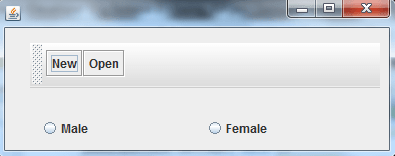
}
Output
package project1;

import java.awt.Dimension;

import java.awt.Rectangle;

import javax.swing.ImageIcon;
import javax.swing.JFrame;
import javax.swing.JLabel;
import javax.swing.JScrollPane;

public class Frame9 extends JFrame {
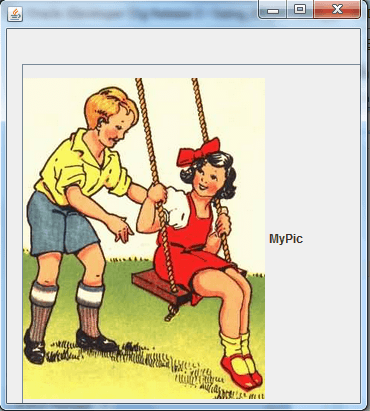
    private JLabel jLabel1 = new JLabel();
    ImageIcon icon = new ImageIcon(Frame2.class.getResource("../images/ss.png"));
    private JScrollPane jScrollPane1 = new JScrollPane();

    public Frame9() {
        try {
            jbInit();
        } catch (Exception e) {
            e.printStackTrace();
        }
    }

    private void jbInit() throws Exception {
        this.getContentPane().setLayout( null );
        this.setSize(new Dimension(369, 412));
        jLabel1.setText("MyPic");
        jLabel1.setBounds(new Rectangle(25, 15, 580, 455));
        jLabel1.setIcon(icon);
        jScrollPane1.setBounds(new Rectangle(15, 35, 350, 350));
        jScrollPane1.getViewport().add(jLabel1);
        this.getContentPane().add(jScrollPane1, null);
        //this.getContentPane().add(jLabel1, null);
    }
    public static void main(String[] args) {
        Frame9 obj = new Frame9();
        obj.setVisible(true);
    }

}
Output
package project1;

import java.awt.Dimension;
import java.awt.Rectangle;
import javax.swing.ImageIcon;
import javax.swing.JFrame;
import javax.swing.JLabel;
import javax.swing.JWindow;

public class SplashScreen extends JWindow {
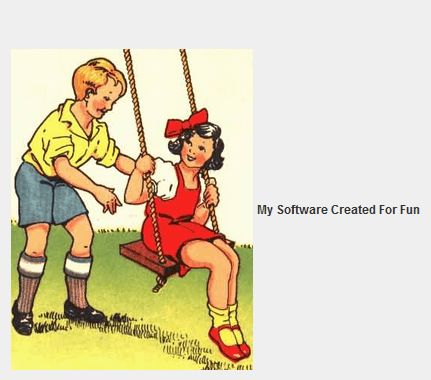
    private JLabel jLabel1 = new JLabel();
    ImageIcon icon = new ImageIcon(SplashScreen.class.getResource("../images/ss.png"));

    public SplashScreen() {
        try {
            jbInit();
        } catch (Exception e) {
            e.printStackTrace();
        }
    }

    private void jbInit() throws Exception {
        this.getContentPane().setLayout( null );
        this.setSize(new Dimension(828, 483));
        jLabel1.setText("My Software Created For Fun");
        jLabel1.setIcon(icon);
        jLabel1.setBounds(new Rectangle(20, 45, 770, 385));
        this.getContentPane().add(jLabel1, null);
        this.setLocation(100,100);
    }
    public static void main(String[] args) {
        SplashScreen s = new SplashScreen();
        s.setVisible(true);
        try {
            Thread.sleep(3000);
        } catch (InterruptedException e) {
        }
        s.setVisible(false);
    }

}
Output
package project1;

import java.awt.Dimension;
import java.awt.event.MouseAdapter;
import java.awt.event.MouseEvent;
import javax.swing.JFrame;
import javax.swing.JMenu;
import javax.swing.JMenuBar;
import javax.swing.JMenuItem;
import javax.swing.JOptionPane;
import javax.swing.JPopupMenu;
              // Context Menu
public class Frame7 extends JFrame {

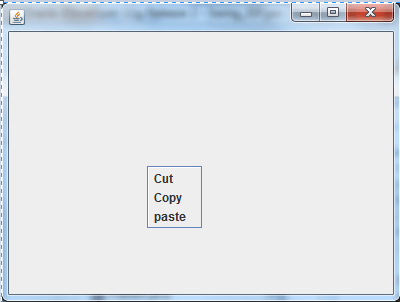
    private JPopupMenu jMenu1 = new JPopupMenu("File");
    private JMenuItem m1 = new JMenuItem("Cut");
    private JMenuItem m2 = new JMenuItem("Copy");
    private JMenuItem m3 = new JMenuItem("paste");

    public Frame7() {
        try {
            jbInit();
        } catch (Exception e) {
            e.printStackTrace();
        }
    }

    private void jbInit() throws Exception {
        this.getContentPane().add(jMenu1);
        this.getContentPane().setLayout( null );
        this.setSize( new Dimension(400, 300) );
        //this.setJMenuBar(jMenuBar1);
        this.addMouseListener(new MouseAdapter() {
                public void mousePressed(MouseEvent e) {
                    this_mousePressed(e);
                }
            });
        //jMenu1.setText("File");

        jMenu1.add(m1);
        jMenu1.add(m2);
        jMenu1.add(m3);
    }
    public static void main(String[] args) {
        Frame7 r = new Frame7();
        r.setVisible(true);
    }

    private void this_mousePressed(MouseEvent e) {
        if(e.isMetaDown())
        {
           //JOptionPane.showMessageDialog(this,"Hello");
           jMenu1.show(e.getComponent(),e.getX(),e.getY());
        }
    }
}
Output
package project1;

import java.awt.Dimension;

import java.awt.Rectangle;

import java.awt.event.ActionEvent;
import java.awt.event.ActionListener;

import javax.swing.JButton;
import javax.swing.JFrame;
import javax.swing.JOptionPane;

public class Frame7 extends JFrame {
    private JButton jButton1 = new JButton();

    public Frame7() {
        try {
            jbInit();
        } catch (Exception e) {
            e.printStackTrace();
        }
    }

    private void jbInit() throws Exception {
        this.getContentPane().setLayout( null );
        this.setSize( new Dimension(400, 300) );
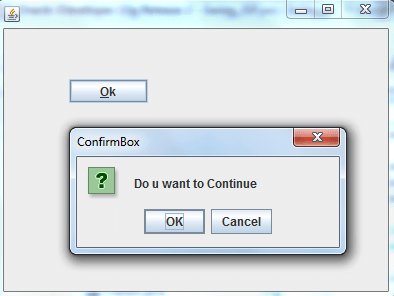
        jButton1.setText("Ok");
        jButton1.setBounds(new Rectangle(65, 50, 79, 24));
        jButton1.setMnemonic('O');
        jButton1.setToolTipText("This is Ok Button");
        jButton1.addActionListener(new ActionListener() {
                public void actionPerformed(ActionEvent e) {
                    jButton1_actionPerformed(e);
                }
            });
        this.getContentPane().add(jButton1, null);
    }
    public static void main(String[] args) {
        Frame7 obj = new Frame7();
        obj.setVisible(true);
    }

    private void jButton1_actionPerformed(ActionEvent e) {
        //JOptionPane.showMessageDialog(this,"This is Msg Box",
        	"Msg-2012",JOptionPane.OK_OPTION);
        int z = JOptionPane.showConfirmDialog(this,"Do u want
        to Continue","ConfirmBox",JOptionPane.OK_CANCEL_OPTION);
        if(z==JOptionPane.OK_OPTION) {
            JOptionPane.showMessageDialog(this,"U Click on OK Button...");
        }
        else
        if(z==JOptionPane.CANCEL_OPTION) {
            JOptionPane.showMessageDialog(this,"U Click on Cancel Button...");
        }

    }
}
Output
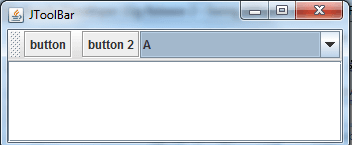
import java.awt.BorderLayout;
import java.awt.Container;
import javax.swing.JButton;
import javax.swing.JComboBox;
import javax.swing.JFrame;
import javax.swing.JScrollPane;
import javax.swing.JTextArea;
import javax.swing.JToolBar;

public class Frame10 {
  public static void main(final String args[]) {
    JFrame frame = new JFrame("JToolBar ");
    frame.setDefaultCloseOperation(JFrame.EXIT_ON_CLOSE);

    JToolBar bar = new JToolBar();
    bar.setRollover(true);


    JButton button = new JButton("button");
    bar.add(button);
    bar.addSeparator();

    bar.add(new JButton("button 2"));

    bar.add(new JComboBox(new String[]{"A","B","C"}));

    Container contentPane = frame.getContentPane();
    contentPane.add(bar, BorderLayout.NORTH);
    JTextArea Area = new JTextArea();
    JScrollPane pane = new JScrollPane(Area);
    contentPane.add(pane, BorderLayout.CENTER);
    frame.setSize(350, 150);
    frame.setVisible(true);
  }
}
Output
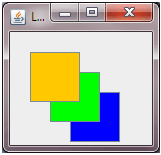
package swing;
import java.awt.*;
import javax.swing.*;
import java.awt.Dimension;
public class LayeredPane extends JFrame
{
private static final long serialVersionUID = 1L;
public LayeredPane() // class constructor
  {
    super("LayeredPane");
		initialize();
    setBounds(100,100,300,200);
    setDefaultCloseOperation(JFrame.EXIT_ON_CLOSE);
    JLayeredPane layeredPane=getLayeredPane();
    JButton top=new JButton();
    top.setBackground(Color.orange);
    top.setBounds(20,20,50,50);
    JButton middle=new JButton();
    middle.setBackground(Color.green);
    middle.setBounds(40,40,50,50);
    JButton bottom=new JButton();
    bottom.setBackground(Color.blue);
    bottom.setBounds(60,60,50,50);
    layeredPane.add(middle,new Integer (2));
    layeredPane.add(top,new Integer(3));
    layeredPane.add(bottom,new Integer(1));
    setVisible(true);}


	  /**
	  * This method initializes this
	  **/
	private void initialize() {
    	this.setSize(new Dimension(449, 238));
    }
	public static void main(String args[]) {
		new LayeredPane();
	}
}
Output
import java.awt.BorderLayout;
import java.awt.Container;
import java.awt.event.ActionEvent;
import java.awt.event.ActionListener;
import java.awt.event.ComponentEvent;
import java.awt.event.ComponentListener;
import javax.swing.JButton;
import javax.swing.JFrame;
import javax.swing.JSplitPane;

public class Component {
  public static void main(String args[]) {
    JFrame frame = new JFrame();
    Container contentPane = frame.getContentPane();

    ComponentListener comp = new ComponentListener() {
      public void componentHidden(ComponentEvent e) {
        dump("Hidden", e);
      }

      public void componentMoved(ComponentEvent e) {
        dump("Moved", e);
      }

      public void componentResized(ComponentEvent e) {
        dump("Resized", e);
      }

      public void componentShown(ComponentEvent e) {
        dump("Shown", e);
      }

      private void dump(String type, ComponentEvent e) {
        System.out.println(e.getComponent().getName() + " : " + type);
      }
    };

    JButton left = new JButton("Left");
    left.setName("Left");
    left.addComponentListener(comp);

    final JButton right = new JButton("Right");
    right.setName("Right");
    right.addComponentListener(comp);

    ActionListener action = new ActionListener() {
      public void actionPerformed(ActionEvent e) {
        right.setVisible(!right.isVisible());
      }
    };
    left.addActionListener(action);
    JSplitPane pane = new JSplitPane(JSplitPane.HORIZONTAL_SPLIT, true, left, right);
    contentPane.add(pane, BorderLayout.CENTER);
    frame.setSize(300, 200);
    frame.setVisible(true);
  }
}
Output
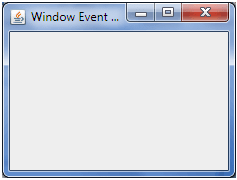
import java.awt.event.WindowEvent;
import java.awt.event.WindowFocusListener;
import javax.swing.JFrame;
import javax.swing.SwingUtilities;

public class WindowDemo extends JFrame implements WindowFocusListener {

    public static void main(String[] args) {
        SwingUtilities.invokeLater(new Runnable() {

            @Override
            public void run() {
                new WindowEventdemo("Window Event Demo").setVisible(true);
            }
        });
    }

    public WindowDemo(String name) {
        super(name);
        addWindowFocusListener(this);
        setDefaultCloseOperation(JFrame.EXIT_ON_CLOSE);
        setSize(300, 300);
    }

    @Override
    public void windowGainedFocus(WindowEvent e) {
        System.out.println("WindowFocusListener method called: windowGainedFocus.");
    }

    @Override
    public void windowLostFocus(WindowEvent e) {
        System.out.println("WindowFocusListener method called: windowLostFocus.");
    }
}
Output
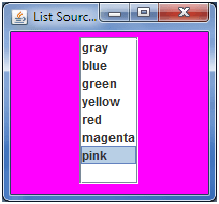
import javax.swing.*;
import javax.swing.event.ListSelectionEvent;
import javax.swing.event.ListSelectionListener;
import java.awt.*;
import java.awt.event.*;

public class JList_Demo extends JFrame {

	JList list;
	String[] listColorNames = { "gray", "blue", "green",
		"yellow","red","magenta","pink" };
	Color[] listColorValues = { Color.GRAY, Color.BLUE, Color.GREEN,
			Color.YELLOW,Color.RED,Color.CYAN,Color.magenta,Color.pink};
	Container contentpane;
	public JList_Demo() {
		super("List Source Demo");
		contentpane = getContentPane();
		contentpane.setLayout(new FlowLayout());
		list = new JList(listColorNames);
		list.setSelectedIndex(0);
		list.setSelectionMode(ListSelectionModel.SINGLE_SELECTION);
		contentpane.add(new JScrollPane(list));
		list.addListSelectionListener(new ListSelectionListener() {

			public void valueChanged(ListSelectionEvent e) {
				contentpane.setBackground
					(listColorValue.getSelectedIndex()]);
			}
		});
		setSize(200, 200);
		setVisible(true);
	}
	public static void main(String[] args) {
		JList_Demo test = new JList_Demo();
		test.setDefaultCloseOperation(JFrame.EXIT_ON_CLOSE);
	}
}
Output
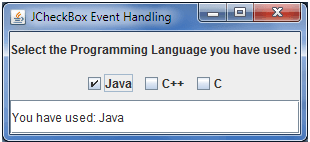
import java.awt.*;
import java.awt.event.*;
import javax.swing.*;

public class CheckBoxDemo implements ItemListener
{
  JFrame frame;
  JCheckBox checkBoxArray[] = new JCheckBox[3];
  JTextField textField;
  JLabel label;
  JPanel panel;
  CheckBoxItemListener()
  {
    frame = new JFrame("JCheckBox Event Handling");
    frame.setLayout(new GridLayout(3,1));
    panel = new JPanel();
    checkBoxArray[0] = new JCheckBox("Java");
    checkBoxArray[1] = new JCheckBox("C++");
    checkBoxArray[2] = new JCheckBox("C");
    for(int i = 0; i<3; i++)
    {
       panel.add(checkBoxArray[i]);
       checkBoxArray[i].addItemListener(this);
    }
    textField = new JTextField(20);
    label = new JLabel("Select the Programming " +
         "Language you have used : ", JLabel.CENTER);
    frame.add(label);
    frame.add(panel);
    frame.add(textField);
    frame.pack();
    frame.setVisible(true);
    frame.setDefaultCloseOperation(JFrame.EXIT_ON_CLOSE);
  }
  public void itemStateChanged(ItemEvent ie)
  {
    String message="You have used: ";
    for(int i=0; i<3; i++)
    {
     if(checkBoxArray[i].isSelected())
       message += checkBoxArray[i].getText() + "  ";
    }
    textField.setText(message);
  }
  public static void main(String[] args)
  {
    new CheckBoxDemo();
  }
}
Output
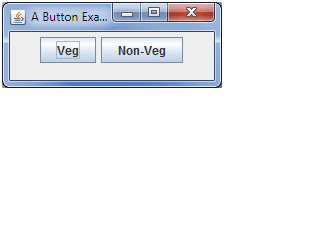
import java.awt.FlowLayout;
import java.awt.event.ActionEvent;
import java.awt.event.ActionListener;
import javax.swing.JButton;
import javax.swing.JFrame;

class Button_Demo implements ActionListener {
  JButton jbutton1 = new JButton("Veg");
  JButton jbutton2 = new JButton("Non-Veg");

  Button_Demo() {
    JFrame jframe = new JFrame("A Button Example");
    jframe.setLayout(new FlowLayout());
    jframe.setSize(220, 90);
    jframe.setDefaultCloseOperation(JFrame.EXIT_ON_CLOSE);

    jbutton1.addActionListener(this);
    jbutton2.addActionListener(this);

    jframe.add(jbutton1);
    jframe.add(jbutton2);

    jframe.setVisible(true);
  }
}
Output
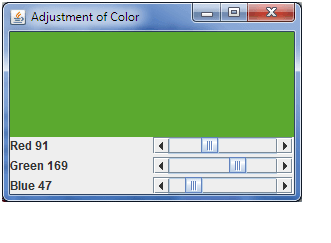
import java.awt.Adjustable;
import java.awt.Color;
import java.awt.Container;
import java.awt.GridLayout;
import java.awt.event.AdjustmentEvent;
import java.awt.event.AdjustmentListener;
import java.awt.event.WindowAdapter;
import java.awt.event.WindowEvent;
import javax.swing.JFrame;
import javax.swing.JLabel;
import javax.swing.JPanel;
import javax.swing.JScrollBar;

public class SelectColor extends JFrame implements AdjustmentListener {

  private JLabel redLabel;
  private JLabel greenLabel;
  private JLabel blueLabel;
  private JScrollBar red;
  private JScrollBar green;
  private JScrollBar blue;
  private JPanel colorPanel;

  public SelectColor() {
    setTitle("Adjustment of Color");
    setSize(300, 200);
    addWindowListener(new WindowAdapter() {
      public void windowClosing(WindowEvent e) {
        System.exit(0);
      }
    });

    Container contentPane = getContentPane();

    JPanel panel = new JPanel();
    panel.setLayout(new GridLayout(3, 2,3,3));

    panel.add(redLabel = new JLabel("Red 0"));
    panel.add(red = new JScrollBar(Adjustable.HORIZONTAL, 0, 0, 0, 255));
    red.setBlockIncrement(16);
    red.addAdjustmentListener(this);

    panel.add(greenLabel = new JLabel("Green 0"));
    panel.add(green = new JScrollBar(Adjustable.HORIZONTAL, 0, 0, 0, 255));
    green.setBlockIncrement(16);
    green.addAdjustmentListener(this);

    panel.add(blueLabel = new JLabel("Blue 0"));
    panel.add(blue = new JScrollBar(Adjustable.HORIZONTAL, 0, 0, 0, 255));
    blue.setBlockIncrement(16);
    blue.addAdjustmentListener(this);

    contentPane.add(panel, "South");

    colorPanel = new JPanel();
    colorPanel.setBackground(new Color(0, 0, 0));
    contentPane.add(colorPanel, "Center");
  }

  public void adjustmentValueChanged(AdjustmentEvent evt) {
    redLabel.setText("Red " + red.getValue());
    greenLabel.setText("Green " + green.getValue());
    blueLabel.setText("Blue " + blue.getValue());
    colorPanel.setBackground(new Color(red.getValue(), green.getValue(),
        blue.getValue()));

    colorPanel.repaint();
  }

  public static void main(String[] args) {
    JFrame frame = new ScrollBarColorSelect();
    frame.setVisible(true);
  }
}
Output
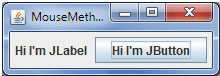
package MouseEvent;
import java.awt.FlowLayout;
import java.awt.event.MouseEvent;
import java.awt.event.MouseListener;
import javax.swing.JButton;
import javax.swing.JFrame;
import javax.swing.JLabel;

public class MouseMethodsDemo implements MouseListener {

	private JLabel label = new JLabel("Hi I'm JLabel ");
	private JButton button = new JButton("Hi I'm JButton");

	public MouseMethods() {
		JFrame frame = new JFrame("MouseMethods");
		frame.setDefaultCloseOperation(JFrame.EXIT_ON_CLOSE);
		frame.setLayout(new FlowLayout());

		label.addMouseListener(this);
		button.addMouseListener(this);

		frame.add(label);
		frame.add(button);
		frame.setVisible(true);
		frame.pack();
	}

	public void mouseClicked(MouseEvent e) {
		if(e.getSource().equals(button)){
			System.out.println("The JButton was clicked...");
		} else if(e.getSource().equals(label)){
			System.out.println("The JLabel was clicked...");
		} else {
			System.out.println("Something else was clicked...");
		}
	}

	public void mouseEntered(MouseEvent e) {
		System.out.println("Mouse has Entered");
	}

	public void mouseExited(MouseEvent e) {
		System.out.println("Mouse has Exit");
	}

	public void mousePressed(MouseEvent e) {
		System.out.println("Mouse has Pressed");
	}

	public void mouseReleased(MouseEvent e) {
		System.out.println("Mouse has Released");
	}

	public static void main(String args[]) {
		new MouseMethods();
	}
}
Output
package swing;
import java.awt.Container;
import javax.swing.JButton;
import javax.swing.JFrame;
import javax.swing.JRootPane;
public class RootPaneDemo {
public static void main(String[] args) {
JFrame f = new JFrame();
f.setDefaultCloseOperation(JFrame.EXIT_ON_CLOSE);
/* client area of the frame
* where child components
* are normally inserted.
*/
JRootPane root = f.getRootPane();
Container content = root.getContentPane();
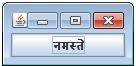
content.add(new JButton("नमसà¥à¤¤à¥‡"));
f.pack();
f.setVisible(true);
}
}
Output
javax.swing.*;

import javax.swing.JMenu;
import javax.swing.JMenuBar;
import javax.swing.JMenuItem;
import javax.swing.JOptionPane;
import javax.swing.SwingUtilities;

public class Nes_Menu {

	Nes_Menu() {
		JMenuBar menubar = new JMenuBar();

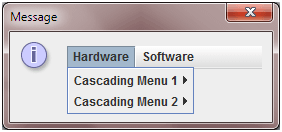
		JMenu parent1 = new JMenu("Hardware");
		JMenu parent2 = new JMenu("Software");

		addSubMenus(parent1, 2);
		addSubMenus(parent2, 2);

		menubar.add(parent1);
		menubar.add(parent2);

		JOptionPane.showMessageDialog(null, menubar);
	}

	public void addSubMenus(JMenu parent, int number) {
		for (int i = 1; i <= number; i++) {
			JMenu menu = new JMenu("Cascading Menu " + i);
			parent.add(menu);
			addSubMenus(menu, number - 1);
			addMenuItems(menu, number);
		}
	}

	public void addMenuItems(JMenu parent, int number) {
		for (int i = 1; i <= number; i++) {
			parent.add(new JMenuItem("Detail" + i));
		}
	}

	public static void main(String[] args) {
		Runnable r = new Runnable() {

			@Override
			public void run() {
				new Nes_Menu();
			}
		};
		SwingUtilities.invokeLater(r);
		// Here, we can safely update the GUI
		// because we'll be called from the
		// event dispatch thread
	}
}
Output
Explore the world of open-source software with Groovy Grails!
— Har Narayan (@har_narayan44) December 6, 2025
Check out their collection of amazing open-source projects and get inspired to contribute or start your own project!
Visit: https://t.co/LYNd8Cs3N7
#OpenSource #GroovyGrails #SoftwareDevelopment #Innovation"