Jlabel
Package :
Class:
Note : JLabel class use to add text and icon labels to a container.
Javax.swing
Class:
javax.swing.JLabel
Note : JLabel class use to add text and icon labels to a container.
| Constructors | Description |
|---|---|
JLabel()
|
This constructor creates instance of a blank JLabel. |
JLabel(String Text) |
This constructor creates instance of a JLabel with the
specified text. |
JLabel(String Text, int Alignment) |
This constructor creates a JLabel instance with the
specified text and horizontal alignment. |
| Method | Description |
|---|---|
void setText(String Text) |
This method sets the text for the label. |
void setFont(Font Text_Font) |
This method sets the font for this component.Arguments |
void setBackground(Color BgColor) |
This method sets the color of the background for the label. |
void setForeground(Color Text_Color) |
This method sets the color of the text for the label. |
void setHorizontalAlignment(int Align)
|
This method sets the alignment of the label's contents along the X axis. |
Example :
package client;

import java.awt.Dimension;
import java.awt.Frame;
import java.awt.Rectangle;
import javax.swing.JFrame;
import javax.swing.JLabel;
import javax.swing.JTextArea;

public class Frame1 extends JFrame
{
	private JLabel jLabel1 = new JLabel();
	private JLabel jLabel2 = new JLabel();
	public Frame1()
	{
		try
		{
			jbInit();
		}
		catch (Exception e)
		{
			e.printStackTrace();
		}
	}
	private void jbInit() throws Exception
	{
		this.getContentPane().setLayout( null );
		this.setSize( new Dimension(400, 300) );
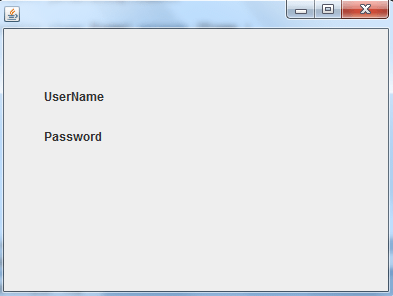
		jLabel1.setText("UserName");
		jLabel1.setBounds(new Rectangle(40, 55, 80, 25));
		jLabel2.setText("Password");
		jLabel2.setBounds(new Rectangle(40, 95, 60, 25));
		this.getContentPane().add(jLabel2, null);
		this.getContentPane().add(jLabel1, null);
	}
	public static void main(String args[])
	{
		Frame1 frame=new Frame1();
		frame.setVisible(true);
	}
}
Output :
JTextField
Package :
Class:
Note :
Javax.swing
Class:
javax.swing.JTextField
Note :
- The JTextField class is a GUI component.
- It can be used to add single line text input to a container.
| Constructor | Description |
|---|---|
JTextField()
|
This constructor creates a blank JTextField instance. |
JTextField(String Text) |
This constructor creates a JTextField instance with the specified text. |
JTextField(String Text) |
This constructor creates a JTextField instance with the specified text. |
JTextField (int Columns)) |
This constructor creates a blank JTextField instance with the specified number of columns. |
JTextField (String Text, int Columns) |
This constructor creates a JTextField instance with the specified text and the specified number of columns. |
| Method | Description |
|---|---|
String getText()
|
This method returns the text in the field. |
void setText(String Text)
|
This method sets the text for the field. |
void setFont (Font Text_Font) |
This method sets the font for this component |
void setEditable(boolean Editable) |
This method sets the field as being editable or fixed. |
void addActionListener(ActionListener
Handler) |
This method configures an event handler for the TextField. |
Example :
package client;

import java.awt.Dimension;
import java.awt.Frame;
import java.awt.Rectangle;
import javax.swing.JFrame;
import javax.swing.JLabel;
import javax.swing.JTextArea;

public class Frame1 extends JFrame
{
	private JLabel jLabel1 = new JLabel();
	private JLabel jLabel2 = new JLabel();
	private JTextField jTextField1 = new JTextField();
	public Frame1()
	{
		try
		{
			jbInit();
		}
		catch (Exception e)
		{
			e.printStackTrace();
		}
	}
	private void jbInit() throws Exception
	{
		this.getContentPane().setLayout( null );
		this.setSize( new Dimension(400, 300) );
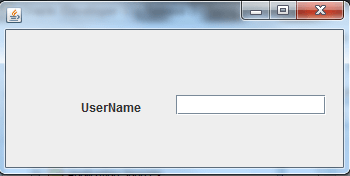
		jLabel1.setText("UserName");
		jLabel1.setBounds(new Rectangle(40, 55, 80, 25));
		jLabel2.setText("Password");
		jLabel2.setBounds(new Rectangle(40, 95, 60, 25));
		jTextArea1.setBounds(new Rectangle(105, 60, 170, 20));
		this.getContentPane().add(jTextArea1, null);
		this.getContentPane().add(jLabel2, null);
		this.getContentPane().add(jLabel1, null);
	}
	public static void main(String args[])
	{
		Frame1 frame=new Frame1();
		frame.setVisible(true);
	}
}
Output :
JPassword
Package :
Class:
Note :
Javax.swing
Class:
javax.swing.JPasswordField
Note :
- JPasswordField class is a GUI component.
- It can be used to add single line text input to a container, without displaying the entry.
| Constructor | Description |
|---|---|
JPasswordField()
|
This Constructor creates a blank JPasswordField instance.s |
JPasswordField (String Text)
|
This Constructor creates a JPasswordField instance with the specified text. |
JPasswordField (int Columns) |
This Constructor creates a blank JPasswordField instance with the specified number of columns. |
JPasswordField (String Text, int Columns) |
This Constructor creates a JPasswordField instance with the specified text and the specified number of columns. |
| Method | Description |
|---|---|
void |
addActionListener(ActionListener Handler) |
char[]
|
getPassword() |
void
|
setBackground (Color BackgroundColor) setText (String Text) |
package client;

import java.awt.Dimension;
import java.awt.Frame;
import java.awt.Rectangle;
import javax.swing.JFrame;
import javax.swing.JLabel;
import javax.swing.JPasswordField;
import javax.swing.JTextArea;

public class Frame1 extends JFrame
{
    private JLabel jLabel1 = new JLabel();
    private JLabel jLabel2 = new JLabel();
    private JTextArea jTextArea1 = new JTextArea();
    private JPasswordField jPasswordField1 = new JPasswordField();
	public Frame1()
	{
    	try
    	{
        	jbInit();
        }
        catch (Exception e)
        {
        	e.printStackTrace();
        }
    }
	private void jbInit() throws Exception
	{
        this.getContentPane().setLayout( null );
        this.setSize( new Dimension(400, 300) );
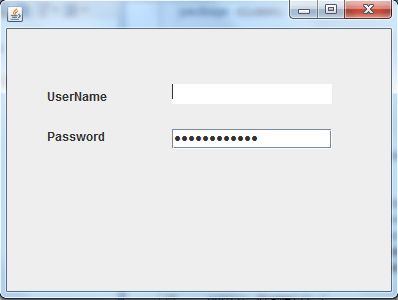
        jLabel1.setText("UserName");
        jLabel1.setBounds(new Rectangle(40, 55, 80, 25));
        jLabel2.setText("Password");
        jLabel2.setBounds(new Rectangle(40, 95, 60, 25));
        jTextArea1.setBounds(new Rectangle(120, 60, 155, 20));
        jPasswordField1.setBounds(new Rectangle(120, 100, 160, 20));
        this.getContentPane().add(jPasswordField1, null);
        this.getContentPane().add(jTextArea1, null);
        this.getContentPane().add(jLabel2, null);
        this.getContentPane().add(jLabel1, null);
    }
    public static void main(String args[])
    {
        Frame1 frame=new Frame1();
        frame.setVisible(true);
    }
}
Output :
JTextArea
Package :
Class:
Note :JTextArea class can be used to multiple line text output to a container.
Javax.swing
Class:
javax.swing.JTextArea
Note :JTextArea class can be used to multiple line text output to a container.
| Constructors | Description |
|---|---|
JTextArea()
|
This Constructor creates a blank JTextArea instance |
JTextArea(String Text) |
This Constructor creates a JTextArea instance with the specified text. |
JTextArea(int Rows, int Columns) |
This Constructor creates a blank JTextArea instance with the specified number of columns. |
JTextArea (String Text, int Rows, int
Columns) |
This Constructor creates a JTextArea instance with the specified text and the specified number of columns. |
| Method | Description |
|---|---|
getText() |
This Method Returns the text in the field. |
setBackground(Color BackgroundColor)
|
This Method sets the background color of the TextArea. |
setEditable(boolean Editable) |
This Method sets the field as being editable or fixed. |
setText(String Text)
|
This Method sets the font for this component |
setLineWrap(boolean LineWrap))
|
This Method sets the font for this component. |
setFont(Font TextFont)
|
This Method sets the text for the field. |
Example :
ppackage client;

import java.awt.Dimension;
import java.awt.Rectangle;
import javax.swing.JFrame;
import javax.swing.JLabel;
import javax.swing.JTextArea;

public class Frame1 extends JFrame
{
    private JTextArea jTextArea1 = new JTextArea();
    private JLabel jLabel1 = new JLabel();
    public Frame1()
    {
        try
        {
        	jbInit();
        }
        catch (Exception e)
        {
        	e.printStackTrace();
        }
    }
    private void jbInit() throws Exception
    {
        this.getContentPane().setLayout( null );
        this.setSize( new Dimension(400, 300) );
        jTextArea1.setBounds(new Rectangle(100, 60, 230, 140));
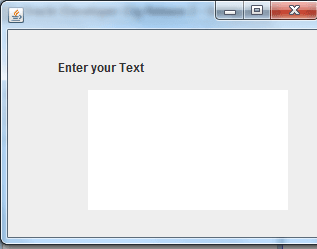
        jLabel1.setText("Enter your Text");
        jLabel1.setBounds(new Rectangle(60, 40, 185, 15));
        this.getContentPane().add(jLabel1, null);
        this.getContentPane().add(jTextArea1, null);
    }
    public static void main(String agrs[])
    {
        Frame1 frame=new Frame1();
        frame.setVisible(true);
    }
}
Output :