MySQL Database Queries
Data Types in MySQL
- MySQL uses many data type to store data into database table. There are many data types in MySQL database.
- Numeric Type
- String Type
- Date and Time Type
| INT | Integer type can be signed or unsigned. Signed INT range -2147483648 to 2147483647 Unsigned INT range 0 to 4294967295. |
| TINYINT | TINYINT can be signed or unsigned. Signed TINYINT range is -128 to 127 Unsigned TINYINT the range is from 0 to 255 |
| SMALLINT |
SMALLINT can be signed or unsigned. Signed SMALLINT range is -32768 to 32767 Unsigned SMALLINT range is0 to 65535 |
| MEDIUMINT |
MEDIUMINT can be signed or unsigned. Signed MEDIUMINT range is -8388608 to 8388607 Unsigned MEDIUMINT range is 0 to 16777215 |
| BIGINT |
BIGINT can be signed or unsigned. Signed BIGINT range is -9223372036854775808 to 9223372036854775807 Unsigned MEDIUMINT range is 0 to 18446744073709551615 |
| FLOAT |
A small number with floating decimal point. Default range is to 10.2, where 2 is the number of decimals and 10 is the total number of digits(including decimals). Decimal precision range is to 24 places for a FLOAT. |
| DOUBLE |
A large number with a floating decimal point. default range is to 16.4, where 4 is the number of decimals and 16 is the total number of digits(including decimals). Decimal precision range is to 53 places for a FLOAT. |
| DECIMAL |
| CHAR(length) | A fixed length String from 1 to 255 in length. |
| VARCHAR(length) | A Fixed length String from 1 to 255 in length and length must be define. Must need to specify length |
| TEXT or BLOB | A text field with range of 65535 characters. Not need to specify length. |
| TINYTEXT or TINYBLOB | A text field with range from 255 characters. Not need to specify length |
| MEDIUMTEXT or MEDIUMBLOB | A text field with range from 16777215 characters. Not need to specify length. |
| LONGTEXT or LONGBLOB | A text field with range from 4294967295 characters. Not need to specify length . |
| ENUM | An ENUM is a string object with a value chosen from a list of permitted values. |
| TIME | Store the time in HH:MM:SS format |
| DATE | Date in YYYY-MM-DD format |
| DATETIME | Date and time combination in YYYY-MM-DD and HH:MM:SS format. |
| TIMESTAMP | This looks like DATETIME format except the hyphens between numbers. 4:45 changed into 445 |
| YEAR(length) | It store years in 2 digit or 4 digit if length is specified like year(2) then the 2013 is stored as 13 . |
Create Database
- Your database needs to be created only once, but you must select it for use each time you begin a Mysql session.
- Create your database in MySQL by using this syntax-
Syntax- CREATE DATABASE < database name >;
example- Mysql> create database tkhts;
	 Query OK, 1 row affected (0.01 sec)
Select Database
- Creating a database does not select it for use. So you must do that explicitly by using this syntax.
Syntax- USE < database name >;
example- Mysql> use tkhts;
 Database changed
Drop Database
- Drop database means you are deleting everything within a database.
- So be careful while deleting any database. To drop database use this syntax-
Syntax-DROP DATABASE < database name >;
example-
 Mysql> drop tkhts;
Query OK, 1 row affected (0.01 sec)
Create Table
- You should need database table to store data, So you can create table in selected database by using this query-
Syntax- CREATE TABLE < table_name >(column_name column_type(range), column_name column_type(range));
example- Mysql> create table employee(emp_id int(5), name char(40), department varchar(40),salary float(10), address varchar(40));This query will create a MySQL table named employee.
Query OK, 0 rows affected (0.23 sec)
Describe Table
- If you want to information about your table, you can use this syntax-
Syntax- DESC < table_name >;
Ecample
Mysql> desc employee;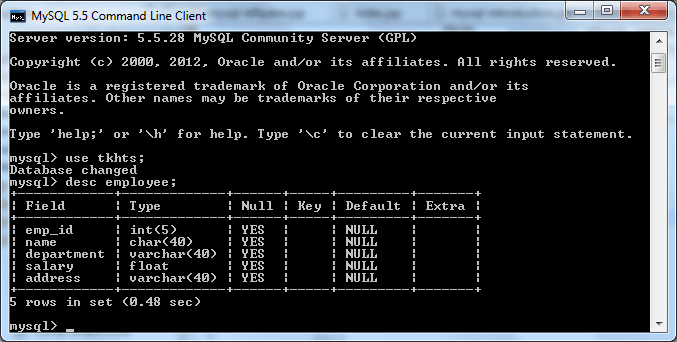
MySQL Insert
- Insert query add a new row of data in a existing table.
- To insert new row of data into a table, you need to run a MySQL query to insert the new row of data in the corresponding columns. Syntax- INSERT INTO < table name >(column1, column2,...columnN) VALUES(value1, value2,...valueN);
example-
insert into employee(emp_id,name,department,salary,address) values(1,'D.G','management',100.0,'noida');
Query OK, 0 rows affected (0.23 sec)

You can also use this query without column name

insert into employee values(2,'S.S','it',60.0,'Gurgon');
Query OK, 0 rows affected (0.07sec)

This query will insert the emp_id, name, department, salary and address data from the values section into the corresponding columns of the employee MySQL table.
MySQL Select
- The select query is used to retrieve information from a table. General syntax of this query is
Syntax-
SELECT < what_to_select >
FROM < which_table >
WHERE < conditions_to_satisfy >
< What_to_select > indicates what you want to see. This can be a list of columns, or * to indicate “all columns.”
< Which_table > indicates the table from which you want to retrieve data.
The WHERE clause is optional. If it is present, < conditions_to_satisfy> specifies one or more conditions that rows must satisfy for retrieval.
example-
Mysql> select*from employee;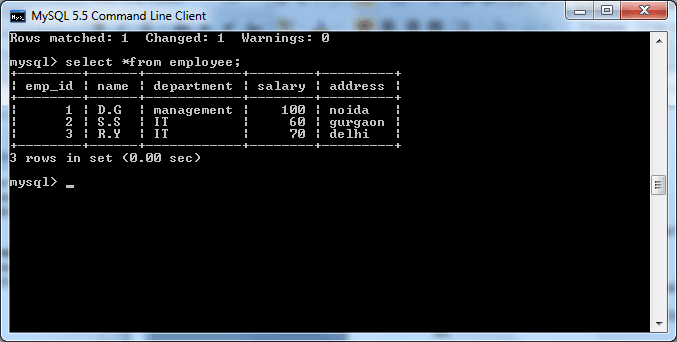
MySQL Update
- You may have need to modify the existing row value of any column. So the update query update the columns of existing rows value of given table. Syntax- UPDATE < table_name >
SET < value1=new value1, value2=new value2...,valueN=new valueN >
WHERE < conditions >;
example-
Mysql> update employee set salary=80 where emp_id=2;
1 row in set(0.04 sec)
Mysql> select*from employee;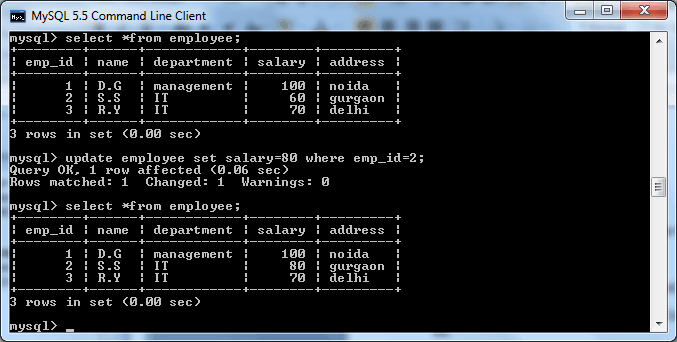
MySQL Delete
- If you want to delete some record of particular row from your table, then you use delete query. Syntax- DELETE FROM < table_name >
WHERE < conditions_to_satisfy >
example-
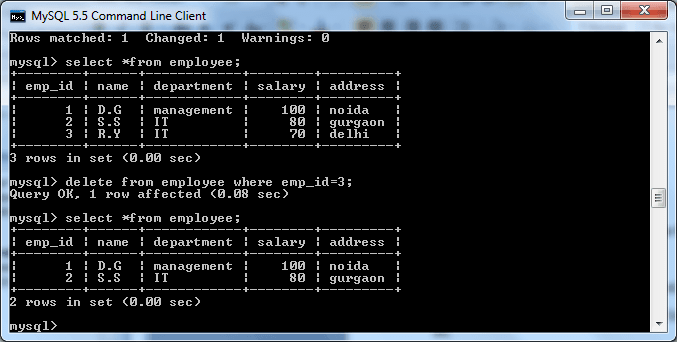
Mysql> DELETE FROM employee where emp_id=3;
Mysql> select *from employee;