

Panel
Package :
Class:
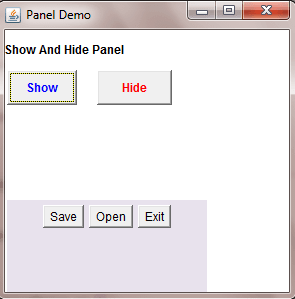
Note :Panel is the simplest container class. A panel provides space in which an application can attach any other component, including other panels.
Java.awt
Class:
java.awt.Panel
Note :Panel is the simplest container class. A panel provides space in which an application can attach any other component, including other panels.
Constructors of Panel Class
| Name | Description |
|---|---|
Panel() |
This constructor creates panel . |
Panel(LayoutManager layout) |
This constructor creates panel with specified Layout. |
Methods of Panel Class
| Method | Description |
|---|---|
getAccessibleContext() |
This method Gets the AccessibleContext associated with this Panel. |
Example :
package com.techknow.panel;

import java.awt.BorderLayout;
import java.awt.Button;
import java.awt.Color;
import java.awt.Font;
import java.awt.Frame;
import java.awt.Label;
import java.awt.Panel;
import java.awt.Rectangle;
import java.awt.event.ActionEvent;
import java.awt.event.ActionListener;

public class PanelDemo extends Frame
	implements ActionListener
{
	private Panel panel1 = new Panel();
	private Panel panel2 = new Panel();
	Button ok = new Button("Show");
	Button cancel = new Button("Hide");
	Button save = new Button("Save");
	Button open = new Button("Open");
	Button exit = new Button("Exit");
	private Label label1 = new Label();
	public PanelDemo()
	{
		try
		{
			jbInit();
		}
		catch (Exception e)
		{
        	e.printStackTrace();
		}
	}
	public static void main(String[] args)
	{
	    PanelDemo panelDemo = new PanelDemo();
	    panelDemo.setSize(300,300);
	    panelDemo.setVisible(true);
	}
	private void jbInit() throws Exception
	{
		this.setLayout(null);
		this.setTitle("Panel Demo");
		panel1.setBounds(new Rectangle
			(0, 0, 395, 120));
		panel1.setLayout(null);
		panel1.add(label1, null);
		panel1.add(ok);
		panel1.add(cancel, null);
		this.add(panel1);
		panel1.setSize(200, 200);
		ok.setBounds(10, 20, 50, 50);
		cancel.setBounds(90, 20, 50, 50);
		ok.setBounds(new Rectangle
			(10, 70, 70, 35));
		ok.setFont(new Font("Tahoma", 1, 12));
		ok.setForeground(Color.blue);
		ok.addActionListener(this);
		cancel.setBounds(new Rectangle
			(100, 70, 75, 35));
		cancel.setFont(new Font("Tahoma", 1, 12));
		cancel.setForeground(Color.red);
		cancel.addActionListener
		(new PanelDemo_cancel_actionAdapter(this));
		exit.addActionListener(this);
		label1.setText("Show And Hide Panel");
		label1.setBounds(new Rectangle
			(5, 35, 240, 30));
		label1.setFont(new Font("Tahoma", 1, 12));
		panel1.setLayout(null);
		panel2.setBounds(new Rectangle
			(10, 200, 395, 265));
		panel2.setSize(200, 200);
		panel2.setBackground(new Color
			(232, 226, 237));
		save.setBounds(10, 220, 50, 50);
		open.setBounds(90, 220, 50, 50);
		exit.setBounds(140, 220, 50, 50);
		panel2.add(save);
		panel2.add(open);
		panel2.add(exit);
		this.add(panel2);
		panel2.setVisible(false);
	}
	public void actionPerformed(ActionEvent e)
	{
		panel2.setVisible(true);
	}
	void cancel_actionPerformed(ActionEvent e)
	{
		panel2.setVisible(false);
	}
	void exit_actionPerformed(ActionEvent e)
	{
		System.exit(0);
	}
}
final class PanelDemo_cancel_actionAdapter
	implements ActionListener
{
	private PanelDemo adaptee;
	PanelDemo_cancel_actionAdapter
		(PanelDemo adaptee)
	{
		this.adaptee = adaptee;
	}
	public void actionPerformed(ActionEvent e)
	{
		adaptee.cancel_actionPerformed(e);
	}
}
Output :
Checkbox
Package :
Class:
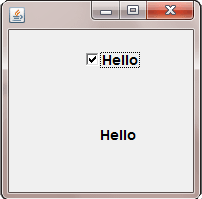
Note : A check box is a graphical component that can be in either an "on" (true) or "off" (false) state.
Java.awt
Class:
java.awt.Checkbox
Note : A check box is a graphical component that can be in either an "on" (true) or "off" (false) state.
Constructors of CheckBox Class
| Name | Description |
|---|---|
Checkbox() |
This constructor creates instance of a CheckBox. |
Checkbox(String label) |
This constructor creates instance of a CheckBox with the particular Label. |
Checkbox(String label, boolean state) |
This constructor creates instance of a CheckBox with particular label of srting and sets the particular state. |
Checkbox(String label, boolean state, CheckboxGroup group) |
This constructor creates instance of a CheckBox with particular label of srting,sets the particular state and add it in a checkboxGroup. |
Methods of CheckBox Class
| Method | Description |
|---|---|
addItemListener(ItemListener l) |
This method sets the actionListener on the Checkbox. |
getCheckboxGroup() |
This method gets the CheckboxGroup of Checkbox. |
getItemListeners() |
This method gets the actionListener. |
getLabel() |
This method gets the Label of Checkbox. |
getState() |
This method gets the state of the Checkbox. |
paramString() |
Returns a string representing the state of this Checkbox. |
removeItemListener(ItemListener l) |
This method removes the specific itemListener. |
setLabel(String label) |
This method sets the label of Checkbox. |
setState(boolean state) |
This method sets the state of Checkbox. |
Example :
package com.techknow.checkbox;

import java.awt.Button;
import java.awt.Checkbox;
import java.awt.Dimension;
import java.awt.Font;
import java.awt.Frame;
import java.awt.Label;
import java.awt.Rectangle;
import java.awt.SystemColor;
import java.awt.event.ActionEvent;
import java.awt.event.ActionListener;
import java.awt.event.MouseAdapter;
import java.awt.event.MouseEvent;
import java.beans.PropertyChangeEvent;
import java.beans.PropertyChangeListener;

public class CheckBox extends Frame
{
	private Checkbox checkbox1 = new Checkbox();
	private Label label1 = new Label();
	private Label label2 = new Label();
	private boolean counter=true;
	public CheckBox()
	{
		try
		{
	    	jbInit();
		}
		catch (Exception e)
		{
	    	e.printStackTrace();
		}
	}
	private void jbInit() throws Exception
	{
		this.setLayout( null );
		this.setSize(new Dimension(270, 202));
		this.setBackground( SystemColor.control );
		checkbox1.setLabel("Hello");
		checkbox1.setBounds(new Rectangle
			(85, 40, 105, 40));
		checkbox1.setFont(new Font("Tahoma", 1, 14));
		checkbox1.addMouseListener(new MouseAdapter()
		{
			public void mouseClicked(MouseEvent e)
			{
				checkbox1_mouseClicked(e);
			}
		});
		label1.setBounds(new Rectangle
			(0, 100, 230, 70));
		label1.setAlignment(1);
		label1.setFont(new Font("Tahoma", 1, 14));
		label2.setText("Check any Checkbox");
		label2.setBounds(new Rectangle(35, 5, 170, 25));
		label2.setFont(new Font("Tahoma", 1, 14));
		label2.setAlignment(1);
		this.add(label2, null);
		this.add(label1, null);
		this.add(checkbox1, null);
	}
	public static void main(String args[])
	{
		CheckBox obj=new CheckBox();
		obj.setSize(200,200);
		obj.setVisible(true);
		obj.setLocation(150,150);
	}
	private void checkbox1_mouseClicked(MouseEvent e)
	{
		if(counter)
		{
			String str=checkbox1.getLabel();
			label1.setText(" "+str);
			counter=false;
		}
		else
		{
			String str=checkbox1.getLabel();
			label1.setText(" ");
			counter=true;
		}
	}
}
Output :
FileDialog
Package :
Class:
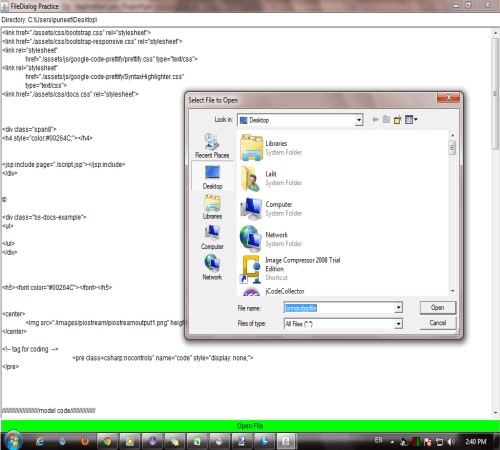
Note :The FileDialog class displays a dialog window from which the user can select a file.
Java.awt
Class:
java.awt.FileDialog
Note :The FileDialog class displays a dialog window from which the user can select a file.
Constructors of FileDialog Class
| Name | Description |
|---|---|
FileDialog(Dialog parent) |
This constructor creates instance of a FileDialog to load File. |
FileDialog(Dialog parent, String title) |
This constructor creates instance of a FileDialog to load file with a appropriate Label. |
FileDialog(Dialog parent, String title, int mode) |
This constructor creates instance of a FileDialog in a specific Parent Container with a appropriate Label and the specific mode to load or save file. |
FileDialog(Frame parent) |
This constructor creates instance of a FileDialog in a specific Parent Container. |
FileDialog(Frame parent,String title) |
This constructor creates instance of a FileDialog in a specific Parent Container with the particular label. |
FileDialog(Frame parent, String title, int mode ) |
This constructor creates instance of a FileDialog in a specific Parent Container, with label and mode to load or save file. |
Methods of FileDialog Class
| Method | Description |
|---|---|
getDirectory() |
This method gets the Directory of File Dialog. |
getFile() |
This method gets the File. |
getFilenameFilter() |
This method shows the file dialog filename is filter. |
getFiles() |
This method returns the files which selected by user. |
getMode() |
This method returns the mode of File Dialog load or save. |
isMultipleMode() |
This method allow to select multiple files at a time. |
setDirectory(String dir) |
This method sets the directory of File Dialog. |
setFile(String file) |
This method sets the file. |
setFilenameFilter(FilenameFilter filter) |
This method sets the filter. |
setMode(int mode) |
This method sets the mode File Dialog. |
Example :
import java.io.*;
import java.awt.*;
import java.awt.event.*;

public class FileDialogDemo extends Frame
	implements ActionListener
{
	FileDialog fd1;
	Button openPlease;
	Label lab1;
	TextArea ta1;
	public FileDialogDemo()
	{
		fd1 = new FileDialog
			(this, "Select File to Open");
		openPlease = new Button("Open File");
		openPlease.setBackground(Color.green);
		lab1 = new Label
			("Complete path of the selected file");
		ta1 = new TextArea(40, 20);
		add(openPlease, "South");
		add(ta1, "Center");
		add(lab1, "North");
		openPlease.addActionListener(this);
		setTitle("FileDialog Practice");
		setSize(525, 325);
		setVisible(true);
		// a shortcut to close the frame
		addWindowListener(new WindowAdapter()
		{
			public void windowClosing
				(WindowEvent e)
			{
				System.exit(0);
			}
		});
	}
	public void actionPerformed(ActionEvent e)
	{
		fd1.setVisible(true);
		lab1.setText("Directory: " +
			fd1.getDirectory());
		display(fd1.getDirectory() +
			fd1.getFile());
	}
	public void display(String fname)
	{
		// this method is for reading a file
		try
		{
			FileInputStream fis1 = new
				FileInputStream(fname);
			int fileSize = fis1.available();
			byte buf1[] = new byte[fileSize];
			fis1.read(buf1);
			String str1 = new String(buf1);
			ta1.setText(str1);
		}
		catch(IOException e)
		{
			System.exit(0);
		}
	}
	public static void main(String args[])
	{
		new FileDialogDemo();
	}
}
Output :
Print Dialog
Package :
Class:
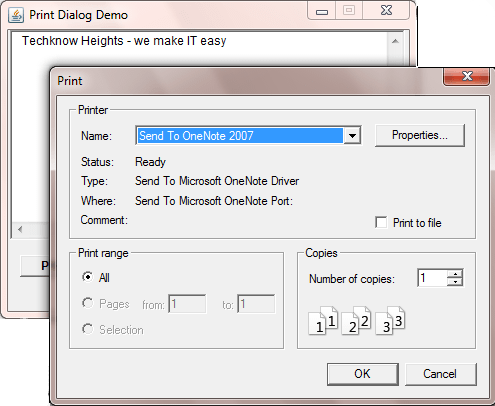
Note :Class used to handle the "Print" command.
Java.awt
Class:
java.awt.PrintDialog
Note :Class used to handle the "Print" command.
- The PrintDialog used to get print information rather than soft copy.
- Print Dialog is mostly used Dialog box in comparison others .
- Most AWT application have Print Dialog to make them Standard.
Constructors of Textfield Class
| Name | Description |
|---|---|
PrintDialog(Printable) |
This constructor creates instance of a PrintDialog. |
Methods of Print Dialog Class
| Method | Description |
|---|---|
doPrint(String text, String
|
This method executes the print command. |
actionPerformed(ActionEvent e) |
This method perform a specific event. |
Example :
package com.techknow.printdialog;

import java.awt.Button;
import java.awt.Dimension;
import java.awt.Font;
import java.awt.Frame;
import java.awt.Rectangle;
import java.awt.SystemColor;
import java.awt.TextArea;
import java.awt.event.ActionEvent;
import java.awt.event.ActionListener;
import java.awt.print.PrinterJob;
import javax.print.PrintService;

public class PrintDialogDemo extends Frame
{
	private Button button1 = new Button();
	private TextArea textArea1 = new TextArea();
	public PrintDialogDemo()
	{
		try
		{
			jbInit();
		}
		catch (Exception e)
		{
			e.printStackTrace();
		}
	}
	private void jbInit() throws Exception
	{
	    this.setLayout( null );
	    this.setSize(new Dimension(407, 309));
	    this.setBackground( SystemColor.control );
	    this.setTitle("Print Dialog Demo");
	    this.setVisible(true);
	    this.setResizable(false);
	    this.setLocation(250,200);
	    button1.setLabel("Print");
	    button1.setBounds(new Rectangle
	    	(15, 250, 70, 22));
	    button1.setFont(new Font("Tahoma", 1, 12));
	    button1.addActionListener(new ActionListener()
	    {
			public void actionPerformed(ActionEvent e)
			{
				button1_actionPerformed(e);
			}
		});
		textArea1.setBounds(new Rectangle
			(5, 25, 395, 210));
		this.add(textArea1, null);
		this.add(button1, null);
	}
	public static void main(String args[])
	{
		new PrintDialogDemo();
	}
	private void button1_actionPerformed
		(ActionEvent e)
	{
		// PrinterJob Class controls
		// printing to a particular print
		service (such as a printer or fax capability).
    	PrinterJob printJob = PrinterJob.getPrinterJob();
		PrintService printer = printJob.getPrintService();
		printJob.printDialog();
	}
}
Output :


