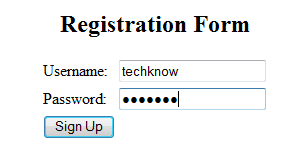
Registration Page
In this example,we create one simple Registration Page in html and connect code with MySQL database and php script.
DataBase
CREATE TABLE mytable(
  id int NOT NULL AUTO_INCREMENT,
  username varchar(16),
  password char(16),
  PRIMARY KEY(id),
  UNIQUE (username)
)
config.php
<?php
$database = "php_db";  // the name of the database.
$server = "localhost";  // server to connect to.
$db_user = "root";  // mysql username to access the database with.
$db_pass = "password";  // mysql password to access the database with.
$table = "mytable";    // the table that this script will set up and use.
$link = mysql_connect($server, $db_user, $db_pass);
mysql_select_db($database,$link);
?>
login.php
<?php
session_start();
include("config.php"); //including config.php in our file
$username = $_POST["username"]; //Storing username in $username variable.
$password = $_POST["password"]; //Storing password in $password variable.


$match = "select id from $table where username = '".$_POST['username']."'
and password = '".$_POST['password']."';";

$qry = mysql_query($match);

$num_rows = mysql_num_rows($qry);


if ($num_rows <= 0) {

echo "Sorry, there is no username $username with the specified password.";

echo "Try again";

exit;

}
else
{
$_SESSION['user']= $_POST["username"];

header("location:admin.php");

// It is the page where you want to redirect user after login.

}
?>
register.php
<html>
<head>
<title> Simple Login Form</title>
</head>
<body>
<div id="containt" align="center">
<form action="login.php" method="post">
<div id="header">vh2 class="sansserif"> Login Form</h2>
 <table>

        <tr>
            <td>Enter Username:</td>
            <td> <input type="text" name="username" size="20"></td>
        </tr>

        <tr>
            <td>Enter Password:</td>
            <td><input type="password" name="password" size="20"></td>
        </tr>
        <tr>
             <td><input type="submit" value="login"></td>
             <td><a href="signup.php">New User</a></td>
        </tr>
 </table>
</form>
</div>
</body>
</html>
signup.php
<?php
include("config.php");
//including config.php in our file

if(!empty($_POST['username']) && !empty($_POST['password'])){
// Now checking user name and password is entered or not.

$user = $_POST['username'];
$pass = $_POST['password'];
$check = "SELECT * from mytable where username = '".$user."'";
$qry = mysql_query($check);
$num_rows = mysql_num_rows($qry);

if($num_rows > 0){
// Here we are checking if username is already exist or not.

echo "The username you have entered is already exist. Please try another username.";
echo '<a href="signup.php">Try Again</a>';
exit;
}

// Now inserting record in database.
$query = "INSERT INTO mytable (username,password) VALUES ('".$user."','".$pass."');";
mysql_query($query);
echo "Thank You for Registration.";
echo '<a href="register.php">Click Here</a> to login you account.';
exit;
}

?>
<html>
<head>
<title>Registration Page | Simple login form</title>
</head>
<body>
<div id="containt" align="center">
<form action="<?php $_SERVER['PHP_SELF']?>" method="post">
<div id="header"><h2 class="sansserif">Registration Form</h2></div>
 <table>

    <tr>
      <td>Username:</td>
      <td> <input type="text" name="username" size="20"></td>
    </tr>

    <tr>
      <td>Password:</td>
      <td><input type="password" name="password" size="20"></td>
     </tr>
     <tr>
       <td><input type="submit" value="Sign Up"></td>

     </tr>
 </table>
</form>
</div>
</body>
</html>
admin.php
<?php
session_start();
echo "You are Welcome ". $_SESSION['user'];
?>
Output :