

Introduction To SLF4J
SLF4J(Simple Logging Facade)for java is an abstraction of different logging frameworks (eg. log4j, java.util.logging, commons logging, logback etc.). SLF4J provide the end-user to plug in the desired logging framework at deployment time i.e we can choose the particular logging framework at application runtime.
SLF4J bindings is an adaptation layer between SLF4J API and the underlying logging framework that you wanted to use.
SLF4J with Log4j
TO use Log4j with SLF4J we need to follow severals steps given below
- Step-1 Download SLF4J and Log4j jar file . click here for Slf4j jar and click her for Log4j jar.
- Step-2 Add slf4j-api-1.7.5.jar, slf4j-log4j12-1.7.5.jar and log4j-1.2.17.jar classpath by rightclick on project >> properties >> java buildpath >> add external jars >> browse for slf4j-api-1.7.5.jar, slf4j-log4j12-1.7.5.jar and log4j-1.2.17.jar >> click OK.
- Step-3 Create java class by right-click on project >> New >> class >> class name >> finish.
- Step-4 Create log4j.properties file by right-click on project >> New >> file.
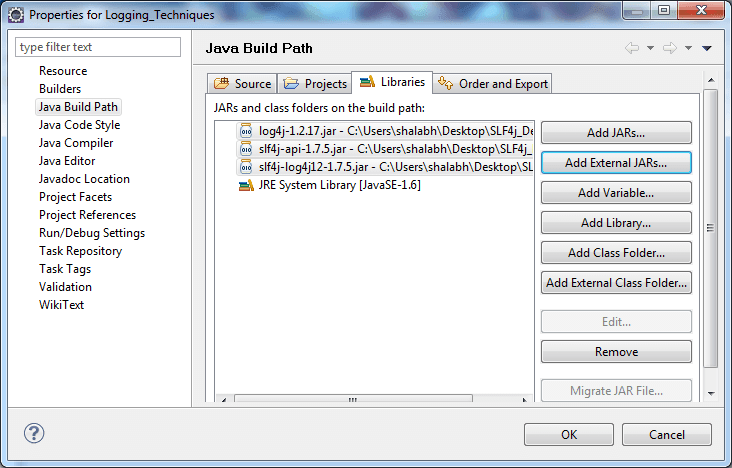
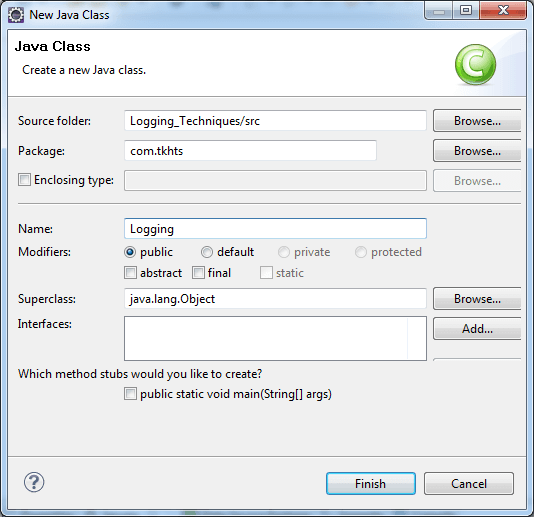
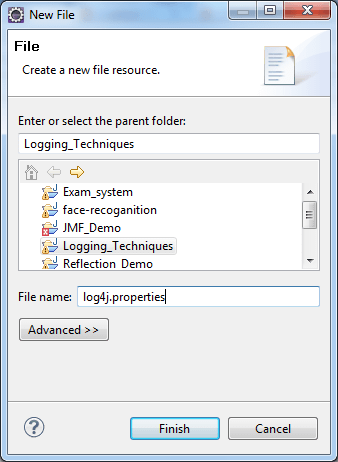
SLF4J with Log4j Example
SLF4jTest.java
import org.slf4j.Logger;
import org.slf4j.LoggerFactory;

public class SLF4jTest
 {
	Logger logger =
		LoggerFactory.getLogger(SLF4jTest.class);
	void calculation()
	{
		logger.debug("Calculation method code starts");
		int a = 100;
		int b = 20;
		int c = 30;
		int d = 0;
		int e = a *b + c-d;
		System.out.println("Now Result is "+e);
		logger.debug("Calculation method ends");
	}

	public static void main(String[] args)
	 {
		SLF4jTest obj= new SLF4jTest();
		obj.calculation();
	 }
}
log4j.properties
log4j.rootLogger=ALL,console

log4j.appender.console =
	org.apache.log4j.ConsoleAppender
log4j.appender.console.layout =
	org.apache.log4j.PatternLayout
log4j.appender.console.layout.ConversionPattern =
	%d %p %t %c - %m%n

# Output to stdout
#log4j.rootLogger=INFO, stdout


#output to file
#log4j.rootLogger=DEBUG, file

#output to stdout, file
#log4j.rootLogger=INFO, file, stdout

# Direct log messages to stdout
#log4j.appender.stdout=org.apache.log4j.ConsoleAppender
#log4j.appender.stdout.Target=System.out
#log4j.appender.stdout.layout=
	org.apache.log4j.PatternLayout
#log4j.appender.stdout.layout.ConversionPattern=
	%d{yyyy-MM-dd HH:mm:ss} %-5p %c{1}:%L - %m%n

# Direct log messages to a log file
#log4j.appender.file=org.apache.log4j.RollingFileAppender
#log4j.appender.file.File=e:\\ducat\\log\\loging.log
#log4j.appender.file.MaxFileSize=1MB
#log4j.appender.file.MaxBackupIndex=1
#log4j.appender.file.layout=org.apache.log4j.PatternLayout
#log4j.appender.file.layout.ConversionPattern=
	%d{yyyy-MM-dd HH:mm:ss} %-5p %c{1}:%L - %m%n
Output
2013-05-29 15:58:06,628 DEBUG main SLF4jTest - Calculation method code starts
Now Result is 2030
2013-05-29 15:58:06,629 DEBUG main SLF4jTest - Calculation method ends
SLF4J with Logback
TO use Logback with SLF4J we need to follow severals steps given below
- Step-1 download Slf4j and logback jar file click here for Slf4j jar and click here for Logback jar.
- Step-2 Add logback-core-1.0.13,logback-classic-1.0.23 and Slf4j-1.7.5 jars into classpath by rightclick on project >> properties >> java buildpath >> add external jars >> browse for logback-core-1.0.13,logback-classic-1.0.23 and Slf4j-1.7.5 jars >> click OK.
- Step-3 Create java class by right-click on project >> New >> class >> class name >> finish.
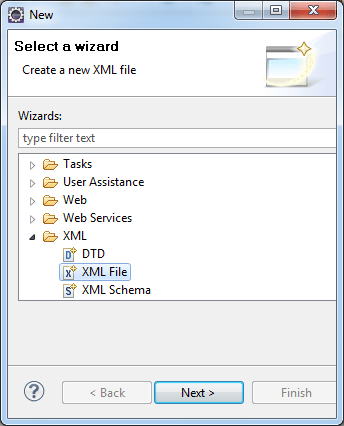
- Step-4 Create logback.xml file by right-click on project >> New >> others >> XML >> XML file.
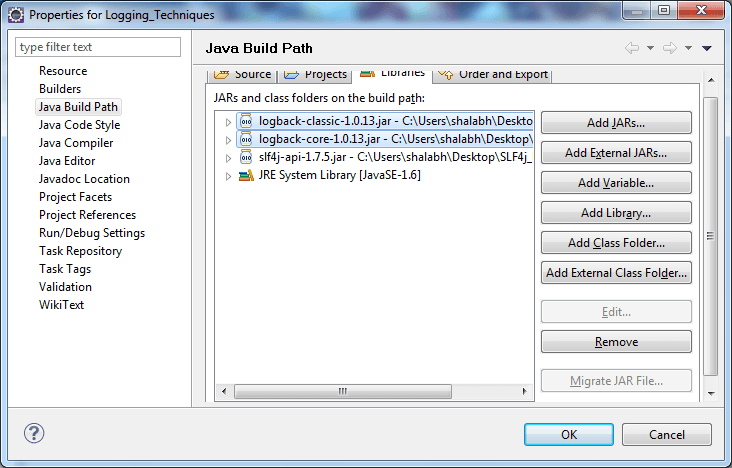
SLF4J with Logback Example
TestLogback.java
import org.slf4j.Logger;
import org.slf4j.LoggerFactory;

public class TestLogback {
  final static Logger logger =
  	LoggerFactory.getLogger(TestLogback.class);
  void calculation()
	{
		logger.debug("Calculation method code starts");
		int a = 100;
		int b = 20;
		int c = 30;
		int d = 0;
		int e = a *b + c-d;
		System.out.println("Now Result is "+e);
		logger.debug("Calculation method ends");
	}

  public static void main(String[] args) {
    logger.info("Entering application.");

    TestLogback testLogback = new TestLogback();
    testLogback.calculation();
    logger.info("Exiting application.");
  }
}
logback.xml
<?xml version="1.0" encoding="UTF-8"?>
<configuration scan="true">

  <appender name="STDOUT" class=
  	"ch.qos.logback.core.ConsoleAppender">
    <!-- encoders are assigned the type
	ch.qos.logback.classic.encoder.PatternLayoutEncoder
	by default -->
    <encoder>
      <pattern>%d{HH:mm:ss.SSS} [%thread] %-5level
      	%logger{36} - %msg%n</pattern>
    </encoder>
  </appender>

  <root level="debug">
    <appender-ref ref="STDOUT" />
  </root>
</configuration>
Output
15:09:37.636 [main] INFO  TestLogback - Entering application.
15:09:37.646 [main] DEBUG TestLogback - Calculation method code starts
Now Result is 2030
15:09:37.647 [main] DEBUG TestLogback - Calculation method ends
15:09:37.647 [main] INFO  TestLogback - Exiting application.


