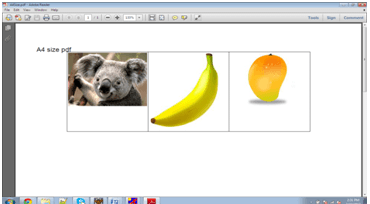
Requirements for creating pdf using eclipse
Requirements:
1. Open source iText.jar download.Step 1:
click on file >>new >> project>>java project>>next>>finish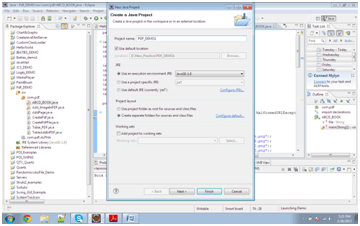
Step 2:
create java class CreatePdf.javaAdd jar in to eclipse
Rightclick on project>>properties>>buildpath>>add external libraries>>browse the iText.jar>>click OK Now write the code given bellow.
- Understand the program creation :
- Create Doucument class and
PdfWriterclass object. - Pass the document object to
PdfWriterwithfileoutput stream. - Now open the cocument and add the new paragraph:-
- Now open the cocument and add the new paragraph.
Document document=new Document();
PdfWriter.getInstance(document, new FileOutputStream(file));
Add Image In PDF
package com.pdf;

import java.io.FileNotFoundException;
import java.io.FileOutputStream;
import java.io.IOException;
import java.net.MalformedURLException;

import com.itextpdf.text.Document;
import com.itextpdf.text.DocumentException;
import com.itextpdf.text.Image;
import com.itextpdf.text.PageSize;
import com.itextpdf.text.Paragraph;
import com.itextpdf.text.pdf.PdfWriter;

public class Add_ImageInPDF {
	private static String file="D:\\A4Size.pdf";

	/**
	 * @param args
	 * @throws DocumentException
	 * @throws IOException
	 * @throws MalformedURLException
	 */
	public static void main(String[] args)
		throws DocumentException,
		MalformedURLException, IOException {
		// TODO Auto-generated method stub
		Document document=new Document
			(PageSize.A4);
		PdfWriter.getInstance(document,
			new FileOutputStream(file));
		document.open();

		Image image=Image.getInstance
		("C:\\Users\\Public\\Pictures
			\\Sample Pictures\\Koala.jpg");
		document.add(new Paragraph
			("A4 size pdf"));
		document.add(image);
		document.close();
}
}
Output: