AspectJ Configuration in Eclipse
- Step-1 Configure aspectj by click on help >> Eclipse Marketplace >> install aspectj development tool kit.
- Step-2 Create new Aspectj project by click on new >> project >> AspectJ >> AspectJ Project.
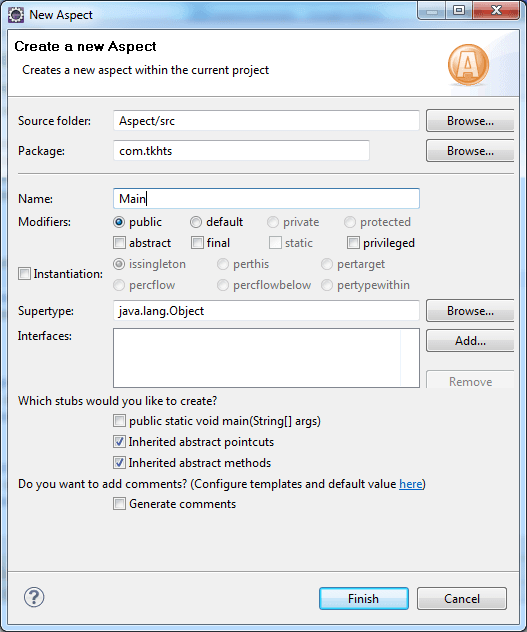
- Step-3 Create new Aspect by right click on project src folder >> new >> Aspect >> Aspect name >> finish.
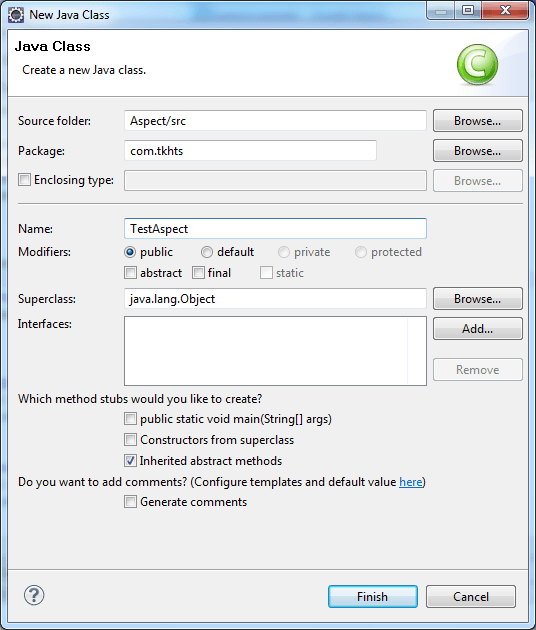
- Step-4 Create java class by right-click on project >> New >> class >> class name >> finish.
AspectJ Example Without Annotation
Main.aj File
package com.tkhts;

public aspect Main {

    pointcut mypointcut() : execution(* *.*(..));
    	//three * means, first * mean any package,
    	second * means any class, third * means any method

    before() : mypointcut() {
    	System.out.println("Start Call ");
    }

    after() returning() : mypointcut() {
        System.out.println(" Stop Call");
    }
}
TestAspectJ.java File
package com.tkhts;

public class TestAspectJ {

	public static void main(String[] args) {
		System.out.println("inside Main ");

		System.out.println("Main Going to End");
	}
}
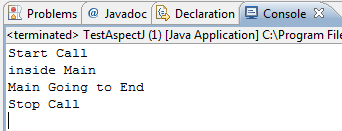
Output